Greasy Fork is available in English.

TikTokHelper

Add compact TikTok tools for video and photo downloads, frame capture, media details, comment translation, customizable filenames, and profile bulk downloads.

スクリプトをインストールするには、Tampermonkey, GreasemonkeyViolentmonkey のような拡張機能のインストールが必要です。

You will need to install an extension such as Tampermonkey or Violentmonkey to install this script.

スクリプトをインストールするには、TampermonkeyViolentmonkey のような拡張機能のインストールが必要です。

スクリプトをインストールするには、TampermonkeyUserscripts のような拡張機能のインストールが必要です。

このスクリプトをインストールするには、Tampermonkeyなどの拡張機能をインストールする必要があります。

このスクリプトをインストールするには、ユーザースクリプト管理ツールの拡張機能をインストールする必要があります。

(ユーザースクリプト管理ツールは設定済みなのでインストール!)

このスタイルをインストールするには、Stylusなどの拡張機能をインストールする必要があります。

このスタイルをインストールするには、Stylus などの拡張機能をインストールする必要があります。

このスタイルをインストールするには、Stylus tなどの拡張機能をインストールする必要があります。

このスタイルをインストールするには、ユーザースタイル管理用の拡張機能をインストールする必要があります。

このスタイルをインストールするには、ユーザースタイル管理用の拡張機能をインストールする必要があります。

このスタイルをインストールするには、ユーザースタイル管理用の拡張機能をインストールする必要があります。

(ユーザースタイル管理ツールは設定済みなのでインストール!)

作者のサイトでサポートを受ける。または、このスクリプトの質問や評価の投稿はこちら通報はこちらへお寄せください
作者
zimabx
1日のインストール数
6
累計インストール数
144
評価
3 0 1
バージョン
1.1.2
作成日
2026/07/13
更新日
2026/08/27
大きさ
498KB
ライセンス
MIT
対象サイト

TikTokHelper

Simplified Chinese

Provide Feedback: supportURL

TikTokHelper is a browser userscript for TikTok Web. It adds a compact action panel to TikTok pages so you can save media, capture video frames, inspect post metadata, and customize filenames without leaving the current page.
image


Features

  • Download the current video or photo post.
  • Capture the current video frame.
  • View media information for the current post.
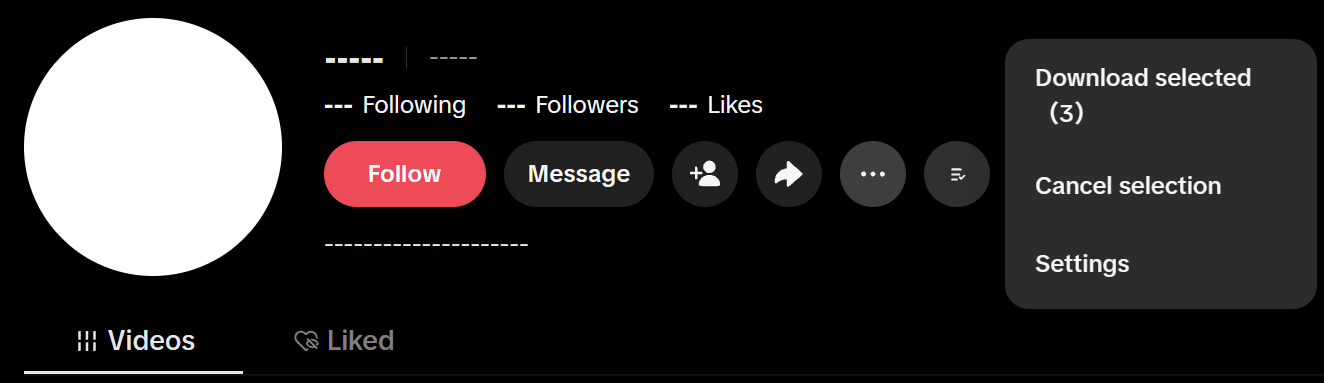
  • Batch-download posts from profile pages.
  • Translate comments.
  • Save images from the comments section.
  • Choose a preferred video source.
  • Customize download filenames with templates.
  • Configure keyboard shortcuts.

image

Installation

To open the TikTokHelper file, you'll need to install the Tampermonkey extension first.

Usage

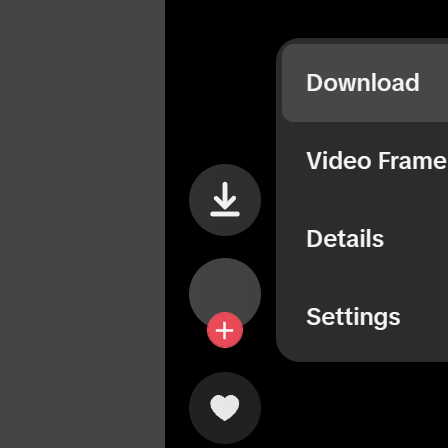
After installation, TikTokHelper adds a small floating button near the active TikTok media area. Open it to access:

  • Download: saves the current video, or all images from a photo post.
  • Video Frame: captures the currently visible video frame and lets you copy or save it.
  • Details: opens a tabbed inspector for media resources, author data, post data, and raw JSON.
  • Settings: changes language, automatic theme behavior, video quality preference, filename rules, source columns, and shortcuts.
  • Translate: Click the translate button to the right of the input field to translate the current comment.

The default download shortcut is M. Other shortcuts are disabled by default and can be configured in Settings.

Release Notes

1.1.X

1.1.2 Upcoming

  • Added settings for comment translation activation, supporting manual and automatic activation.
  • The startup page settings have been changed to a drop-down menu, supporting the original and dark startup pages.
  • Unified the “Batch Download” button on user profiles with the download icon on video pages.
  • Added a feature to download comment stickers; tapping a sticker allows you to download the original file directly.
  • Fixed an issue where live stream content was not recognized on the Recommendations page.

1.1.1

  • Adjusted the download button position in fullscreen mode. It now appears below the More button.
  • Added a dark startup page that changes the initial white loading background to black.

1.1.0

  • Added PNG / JPG / WEBP formats for frame saving, with an improved frame copy and save workflow.
  • Added retry support for failed profile bulk downloads, retrying only failed posts or album images.
  • Added --Continue Download-
  • after cancelling a profile bulk download, automatically skipping completed posts and images.
  • Downloads can now abort the active network transfer instead of only stopping subsequent tasks.
  • Improved comment translation with batch translation and better caching, reducing duplicate requests and improving performance for large comment sections.
  • Improved translation result detection and caching for unchanged or untranslated text.
  • Improved album download and retry logic so only failed or unfinished images are downloaded again.
  • Improved profile post resolution by reusing available local page data before performing additional scans.
  • Fixed frame capture occasionally targeting a neighboring video instead of the current post.
  • Fixed incorrect Live frame filenames and the accidental use of regular post metadata for Live captures.
  • Fixed inconsistent file extensions between main downloads and downloads from the details panel.
  • Fixed incorrect fallback handling for some image file extensions.
  • Fixed duplicate shortcut conflicts and added clear conflict warnings.
  • Improved status and progress feedback for downloads, cancellations, partial failures, retries, and resumed downloads.
  • Improved filename generation, album numbering, and multiple UI interaction details.
  • Removed redundant code and unnecessary work to improve overall performance and stability.

Other

This is not an official TikTok product. Use it only for content you have the right to save.

License

MIT